
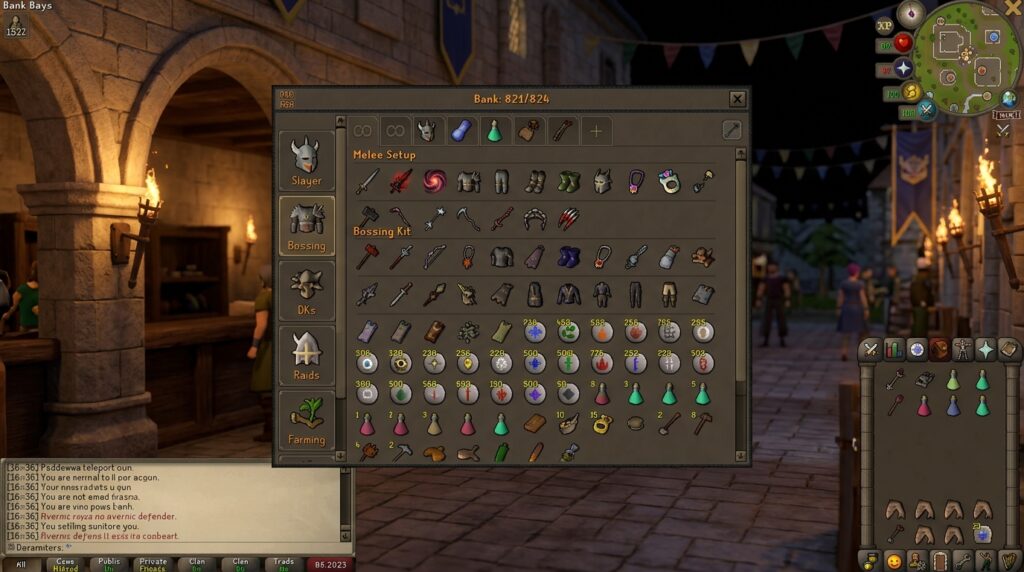
Managing your bank in Old School RuneScape can feel like a chore, especially when you’re trying to gear up quickly for a Zulrah trip or a Chambers of Xeric raid. Using osrs bank tag layouts allows you to move your items into any spot on the grid, regardless of where they actually sit in your bank. You can finally stop hunting through messy tabs and start organizing your gear exactly how it looks on your character and in your inventory.
Imagine opening your bank and seeing your Slayer setup perfectly mirrored, with your Slayer Helm at the top and your Cannonballs right where you need them. You can even place the same Super Restore potion in four different slots to represent a full row of supplies without needing extra items. This plugin saves you precious time between boss kills so you can spend less time clicking through your bank and more time earning loot.
Key Takeaways
- Bank tag layouts allow you to organize items on a custom grid that mirrors your character equipment and inventory, regardless of where items are actually stored in your bank.
- Utilize the item duplication feature to create visual maps of full supply rows, enabling you to withdraw entire inventory loadouts using muscle memory without needing extra physical items.
- Importing community-created export strings provides instant, professional setups for high-level raids like Chambers of Xeric or Theatre of Blood, ensuring no critical gear is forgotten.
- Integrating potion storage and custom spacing into your layouts eliminates mental fatigue and reduces gearing time from minutes to seconds.
Essential Setup For Custom Grid Positioning
To get started with your custom bank tag layouts, you first need to enable the layout toggle by clicking the small wrench icon within your bank interface. Once this setting is active, the standard rules of bank organization disappear and you gain total freedom over your item placement. You can simply drag and drop your gear anywhere on the 8xN grid, even if those items are stored in completely different tabs in your main bank. This allows you to leave empty spaces or gaps to visually separate your combat gear from your consumable supplies. It is the perfect way to make sure your Slayer helm and your Dragon defender are exactly where you want them every time you open the tab.
The real power of this setup comes from the ability to duplicate item icons to represent a full inventory loadout. For example, if you are preparing for a Chambers of Xeric raid, you can place a single Saradomin brew in your bank and then copy that icon across four different slots to mimic a full row in your backpack. This visual map means you no longer have to count items or search for specific potions while you are in a hurry to gear up. By mirroring your actual inventory layout inside the bank screen, you can withdraw your entire setup with muscle memory. This simple change eliminates the stress of forgetting a crucial switch like your Ava’s assembler or an emergency teleport.
Building Perfect Raids And Slayer Templates
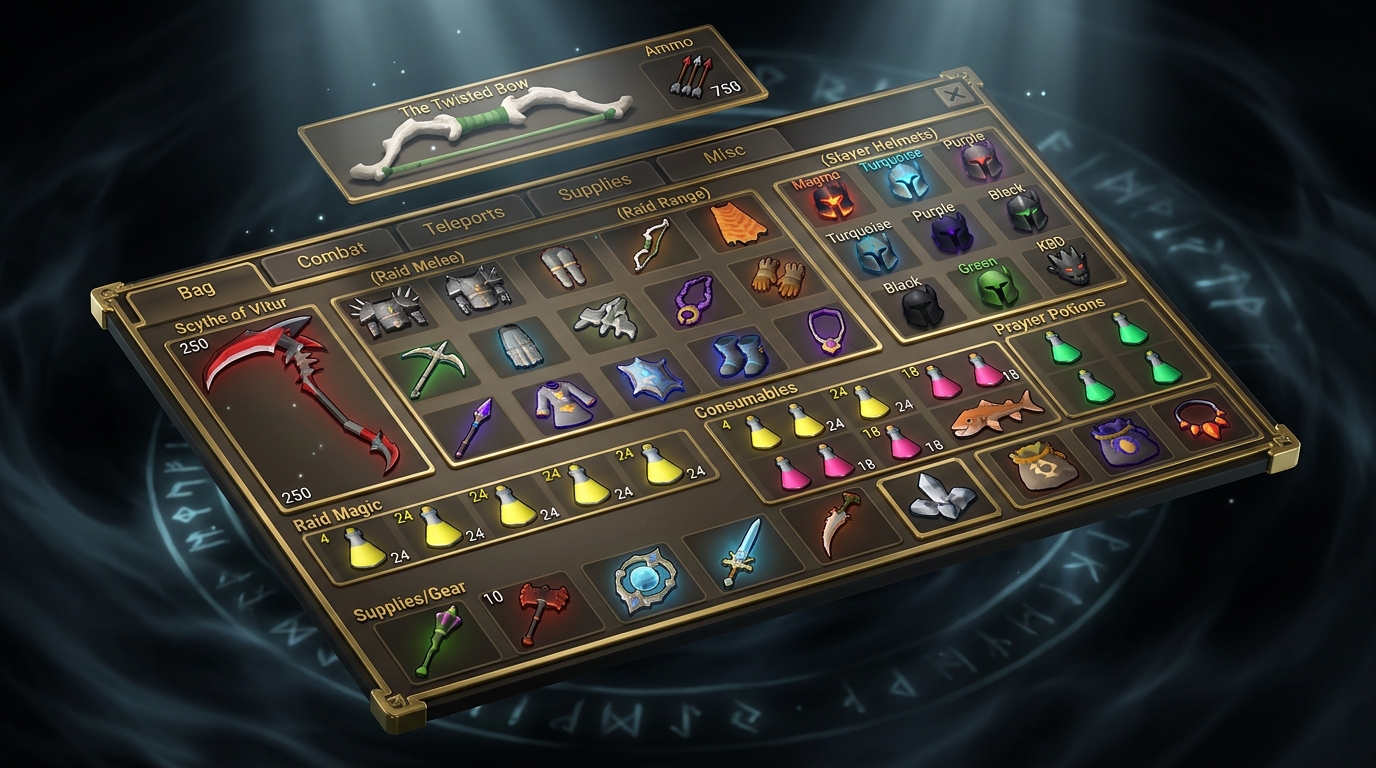
Setting up your bank for high level activities like the Chambers of Xeric or Slayer tasks becomes much faster when you treat your bank tab like a blueprint for your character. By using the bank tag layouts plugin, you can arrange your gear at the top of the screen to match the exact slots of your equipment window. This means you can place your Slayer helmet, Fighter torso, and Dragon defender in a visual grid that mirrors where they go on your body. Instead of hunting through thousands of items, you can simply click down the line to get fully dressed in seconds. This visual approach reduces the mental fatigue of gearing up and ensures you never forget a critical item like your Salve amulet or Fire cape before heading out.
The bottom half of your layout should focus on your inventory supplies to ensure you are always ready for combat. You can use the item duplication feature to fill entire rows with Saradomin brews, Super restores, or Divine combat potions without needing to move items around manually. For a standard Slayer task, you might place your Holy wrench and Rune pouch in the first two slots, followed by rows of Prayer potions to match your actual inventory bag. This setup allows you to withdraw your entire kit with a series of quick clicks, mimicking the exact pattern you see while playing. Having a consistent layout for every boss or task means you spend less time in the bank and more time gaining experience.
Creating these templates is even easier when you use the auto layout feature to capture your current setup. Once you have your ideal gear and inventory ready for a Theatre of Blood run, you can generate a preset that saves that exact arrangement for the future. You can even leave empty spaces in the grid to separate your melee switches from your magic switches, making it easy to see if you are missing a piece of Ancestral or a specific ring. These custom layouts turn your bank into a streamlined workstation where every item has a dedicated home. By organizing your bank this way, you eliminate the clutter and focus entirely on the gameplay.
Importing Pro Layouts From Community Websites
You do not have to spend hours manually dragging items around to create the perfect gear setup for high level raiding. Community hubs allow you to browse thousands of professional setups created by experienced players who have already mastered the content. Once you find a layout that fits your current gear progression, you can simply copy the export string and paste it directly into your client. This instantly populates your bank tag with a clean, organized view that separates your combat gear from your supplies. It is the fastest way to ensure you never forget a crucial item like your Salve Amulet or a specific switch for a boss.
If you are gearing up for the Tombs of Amascut, using an imported layout can save you from the headache of forgetting your partisan or smelling salts. These community templates often organize items into visual grids that mimic your inventory, making it easy to withdraw everything in the correct order. You can find specific layouts tailored for different raid scales, whether you are running solo expert modes or large group encounters. Having a visual guide for your switches, such as swapping between a Bow of Faerdhinen and an Osmumten’s Fang, keeps your bank organized and your mind focused on the mechanics.
Importing these layouts is also incredibly helpful for learning the Theatre of Blood where inventory management is a matter of life and death. You can download a template that perfectly positions your Scythe of Vitur, Void Knight equipment, and specialized potions so they are always in the same spot. This consistency builds muscle memory, helping you gear up in seconds between wipes or successful completions. Instead of scrolling through a messy bank, you get a clear and professional interface that looks exactly like the setups used by the most efficient players in the game.
Integrating Potion Storage And Item Duplication
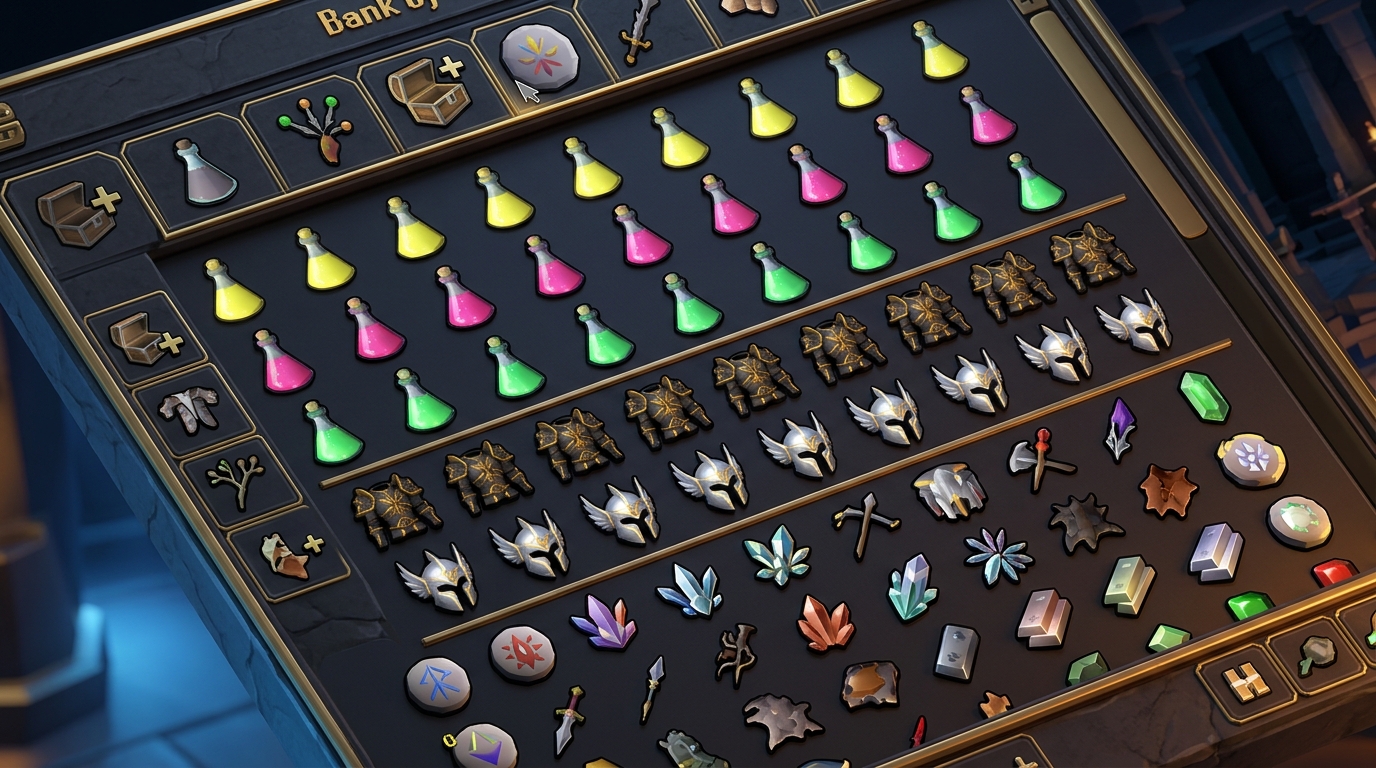
Setting up your bank tag layouts to include multiple doses of the same potion is one of the best ways to speed up your gearing process for raids like Chambers of Xeric. By using the item duplication feature, you can visually map out an entire row of four Prayer Potions or Saradomin Brews even if you only have one stack of those items in your bank. This allows you to see exactly how your inventory will look before you even click a single item, making it much harder to forget a crucial supply. You can simply click each icon in the layout to pull the exact number of potions you need for your trip. It removes the guesswork of counting out doses and keeps your gearing visual and intuitive.
The true magic happens when you integrate your Potion Storage directly into these custom layouts to save time and bank space. Instead of searching through a messy tab for different dose sizes, the plugin allows you to pull supplies directly from your Potion Storage into your specific layout grid. This is incredibly helpful for Slayer tasks where you might need a single dose of an Antifire potion alongside several Super Combat Potions. You can arrange these items in a way that mimics your inventory setup, ensuring that your clicks are consistent every single time you gear up. Having everything organized this way means you spend less time banking and more time actually playing the game.
Streamline Your Gearing with Custom Layouts
Mastering your bank tag layouts is the ultimate way to stop staring at your bank and start playing the game. By setting up custom grids that mirror your inventory for activities like Slayer or the Chambers of Xeric, you remove the mental fatigue of hunting for that last Divine Super Combat potion. You can visually separate your equipped gear from your inventory supplies, ensuring you never forget your dramen staff or teleports again. These layouts act as a visual checklist that makes gearing up for a boss trip take seconds instead of minutes.
Take these tips back to Gielinor to spend less time clicking your bank and more time clicking monsters for those big drops. Whether you are prepping for a quick farm run or a long night of raiding with friends, a clean layout keeps your momentum going. Just as you might master the grid to navigate boss mechanics, organizing your bank ensures you are always prepared for the fight. You will find that the game feels much smoother when you can withdraw a full setup of Karil’s and a blowpipe with just a few clicks. Now that your bank is organized, you are ready to head out and secure your first kill or finally claim that elusive boss pet or unique loot.
Frequently Asked Questions
1. How do I start using bank tag layouts?
Open your bank and click on the small wrench icon to enable the layout toggle. Once this is active, you can drag and drop your gear anywhere on the grid to create your own custom setup.
2. Can I have the same item appear in multiple spots?
Yes, you can duplicate item icons to fill out your layout without needing extra items in your bank. This is perfect for representing a full row of Saradomin brews or Super restores for your next boss trip.
3. Will moving items in a layout mess up my main bank tabs?
Not at all, because layouts work independently from your actual bank organization. You can move your Slayer helm or Dragon defender around in the layout tab while they stay exactly where they belong in your main bank.
4. Is it possible to leave empty spaces between my gear?
You have total freedom to leave gaps or empty rows to visually separate different parts of your gear. This helps you keep your combat equipment like a Bandos chestplate clearly separated from your potions and food.
5. How does this help with raids like Chambers of Xeric?
You can mirror your exact inventory and equipment setup within the bank interface so you can gear up in seconds. This means you spend less time clicking and more time getting through the raid and earning loot.
6. Can I use layouts for specific activities like Slayer?
Layouts are amazing for Slayer because you can keep your Slayer helm, Cannonballs, and combat potions all in one neat view. You will never have to hunt through messy tabs for your gear again.
7. Do I need to own multiple potions to show a full inventory in the layout?
You only need one of the actual items in your bank to create a full row of icons in your layout. The plugin lets you copy the icon as many times as you want to represent a full inventory loadout. Just like using the RuneLite Quest Helper to highlight items, layouts ensure you always have the right supplies ready for your next Zulrah trip or raid.